
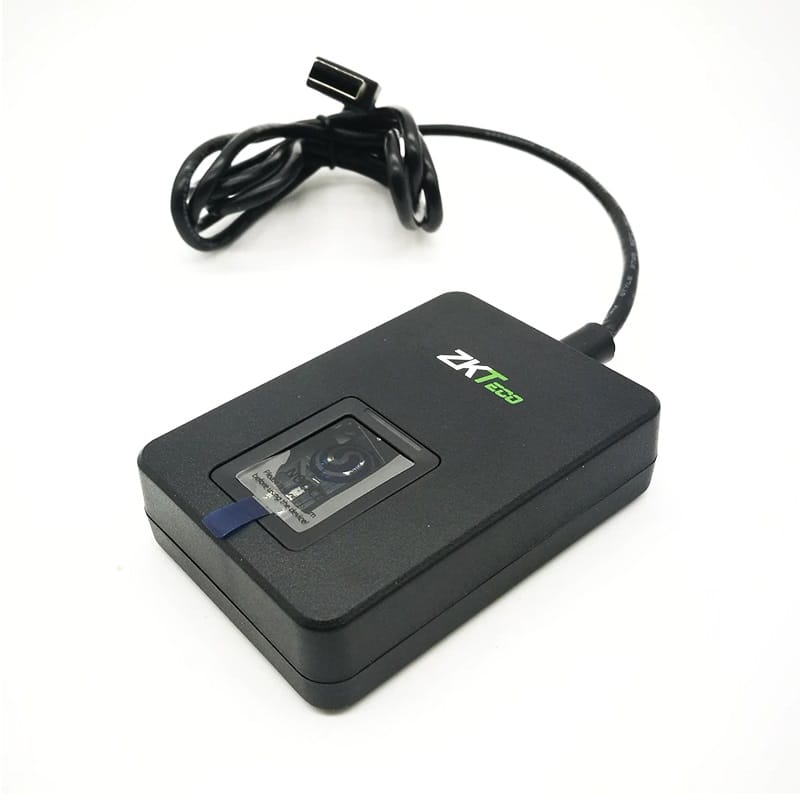
Description
Zk9500 usb fingerprint scanner key features
- High-Resolution Optical Sensor: Captures detailed fingerprint images with 500 DPI resolution for high accuracy.
- Fast Recognition: Quickly processes fingerprint data for fast authentication.
- Robust Performance: Recognizes fingerprints reliably, including those that are dry, wet, or rough.
- Live Finger Detection: Prevents spoofing attempts by detecting live fingers.
- Plug-and-Play USB: Connects easily to a computer’s USB port, requiring no special setup skills.
- Compact Design: Small and lightweight for convenient desktop use.
- Software Integration: Works with ZKTeco software for applications such as time and attendance and access control.
- Developer-Friendly: A Software Development Kit (SDK) is available to create custom applications.
How zk9500 usb fingerprint scanner Works
- Connect to PC: The ZK9500 is a desktop device that connects to a computer via its USB cable.
- Finger Registration: Fingerprints are enrolled through the ZKTeco software.
- Authentication: When a user places their finger on the scanner, the device captures the image and sends it for identification to the software.
- Application Use: The software then uses this biometric data to manage user access or track attendance
ZK9500 Driver & SDK Download Links
The ZK9500 typically requires specific drivers or a Software Development Kit (SDK) for integration into custom applications.
- Official Download Center: Find the latest manuals and datasheets on the ZKTeco Download Center.
- Windows Driver (v1.2.6.0): Download the official Windows controller driver from Treexy or use the manual setup guide for Windows 10/11.
- ZKFinger SDK:
- Windows: Provides development documents and a demo for 32/64-bit systems ZKFinger SDK for Windows.
- Android: Supports mobile app development for Android OS ZKFinger SDK for Android.

Reviews
There are no reviews yet.