
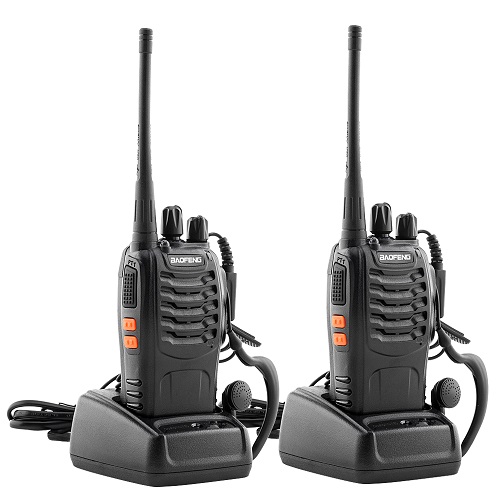
Description
Two way radio calls are instantaneous, push-to-talk (PTT) voice transmissions between handheld, mobile, or base stations, allowing users to send and receive messages on shared frequencies. Operating via UHF/VHF, they offer direct, reliable, and durable communication, commonly using analog or digital signals for quick, coordinated group interaction.
Key Characteristics of Two Way Radio Calls
- Push to talk (PTT): The user presses a button to transmit and releases it to listen, making it faster than dialing a phone.
- Half- Duplex Communication: Only one person can talk at a time, requiring users to take turns on a channel.
- Group Communication: Multiple users on the same channel can hear the communication, facilitating group coordination.
- Direct or System- Based; Calls can be unit-to-unit (radio to radio) or routed through a repeater for extended range.
- Durability and Reliability: Ideal for rugged environments like construction, security, or outdoor activities where cellular coverage is poor.
Types of Radio Calls
- Individual Call: A private, one-on-one call between two users.
- Group Call: A call sent to a specific, predefined group of users, commonly used in business or emergency services.
- All Call: A broadcast to every radio within range or on the system.
- Emergency Call: High-priority calls often with pre-emptive access to the channel.
Common Radio Terminology (Etiquette)
- ” Over” – I have finished speaking and am waiting for a response.
- “Roger/ Roger That’ – Message received and understood.
- “Wilco” – Abbreviation for “will comply,” meaning the message is understood and will be acted upon.
- ‘ Stand B’ – I am busy, but will get back to you shortly.
- “Break, Breal” – Used to interrupt a conversation for an urgent, non-emergency message.
- “Copy” – I understand.
- “What’s your 20?” – A common, though less formal, phrase for “What is your location?”.
Basic Operation
- Check the channel: Ensure the channel is clear to avoid interrupting existing conversations.
- Push to talk: Press the PTT button, wait a second for the transmission to connect.
- Speak Clearly: Speak directly into the microphone at a normal volume.
- Release to listen: Release the button immediately when finished to hear the reply.

Reviews
There are no reviews yet.